


Marketing Automation for Small Businesses: A Practical Growth Guide

Marketing automation isn't some complex, enterprise-level luxury reserved for the Fortune 500. Think of it more like a secret weapon for small businesses. It’s the software that handles your repetitive marketing chores, freeing you up while it works behind the scenes to nurture leads and build customer relationships.
For a local salon, it’s about automatically sending a "we miss you" text with a special offer to a client who hasn't visited in three months. For an online shop, it's about recovering sales by emailing a customer who left a pair of sneakers in their shopping cart. It all happens on autopilot, letting you deliver those personal touches that create loyal customers, all without needing a massive team to pull it off.
Why Marketing Automation Is a Game Changer for Small Businesses
As a small business owner, you’re already wearing a dozen hats. Juggling customers, inventory, and finances is a full-time job in itself, and marketing often feels like another one you just don't have time for. This is exactly where automation comes in, acting as your tireless digital assistant that works around the clock.
But this is about so much more than just scheduling a few emails. Real automation creates smart, connected systems that help your business respond faster and more effectively to customer needs. It all starts with good data, and for a deeper dive on that, check out our guide on CRM management and why it matters.
The Tangible Impact on Your Bottom Line
The numbers here really speak for themselves. Imagine a system that could bring in a staggering $5.44 in revenue for every single dollar you invest. That 544% return over three years isn't just a pie-in-the-sky figure; it's a real-world benchmark. Many businesses I've worked with see their investment paid back in under six months.
This impressive ROI isn't magic. It comes from concrete improvements across your business:
- Saving Your Sanity (and Time): Instead of manually sending a welcome email every time someone signs up for your newsletter, an automation does it instantly. That’s five minutes saved per subscriber, which adds up to hours every month.
- Smarter Lead Nurturing: A potential client downloads your "Kitchen Remodel Checklist." Automation can then send them a series of helpful emails: "3 Common Remodeling Mistakes," "How to Choose a Countertop," and finally, an invitation for a free consultation.
- A Better Customer Experience: A customer buys a new plant from your online store. An automated email goes out a week later with a simple subject: "How's your new plant doing?" and includes a link to a care guide. That small, thoughtful touch builds loyalty.
- Boosting Your Sales: Simple workflows, like abandoned cart reminders, can immediately claw back revenue that would have otherwise vanished into thin air. A single automated email can recover 5-10% of those would-be-lost sales.
Marketing automation isn’t about replacing the human touch. It’s about automating the mundane tasks so you have more time for the meaningful, personal interactions that actually close deals and build lasting relationships.
Your Small Business Automation Starter Kit
To make this feel more concrete, let's look at the foundational automations that deliver the biggest bang for your buck right out of the gate. These are the workhorses you can set up to start seeing immediate results.
| Automation Type | What It Does | Practical Example for Your Business |
|---|---|---|
| Welcome Series | Sends a sequence of emails to new subscribers or customers. | A new subscriber to a bakery's newsletter gets an immediate "welcome" email with a 10% off coupon. |
| Lead Nurturing | Delivers targeted content based on a user's behavior or interests. | Someone who downloaded an ebook about "Beginner's SEO" gets follow-up emails with related blog posts. |
| Abandoned Cart | Triggers an email or SMS if a customer leaves items in their online cart. | A customer leaves a t-shirt in their cart; an hour later, they get an email with a picture of the shirt and a link to check out. |
| Appointment Reminders | Sends automated emails or texts before a scheduled meeting or service. | A dental patient receives an SMS reminder 24 hours before their cleaning appointment. |
| Customer Feedback | Automatically requests a review or feedback after a purchase or service. | Three days after a product is delivered, the customer gets an email asking them to leave a review on Google. |
Starting with just one or two of these can make a massive difference in your daily workload and your bottom line.
Practical Examples of Small Business Automation
To see how powerful this can be, you can even look at how multi-location businesses use franchise marketing automation strategies to maintain consistency and drive growth.
But let's bring it back to a local level.
Picture a small fitness studio. Instead of someone manually calling or emailing members about renewals, an automated workflow takes over. It sends a friendly reminder email 30 days before a membership expires, a follow-up SMS a week before, and a special "renew now and save" offer on the final day. This simple sequence ensures no one falls through the cracks and maximizes retention—all while the owner is on the floor training clients.
Setting the Strategic Foundation for Automation
It’s tempting to jump right into picking out slick automation software, but that’s like trying to build a house without a blueprint. The fanciest tools in the world won’t help if you don’t know what you're trying to build. Before you spend a single dollar, the most important work happens on paper, figuring out exactly what you want your marketing automation for small businesses to do for you.
A powerful strategy always starts with a simple question: What does success actually look like for my business right now? So many small business owners start with fuzzy goals like "get more sales," but that's just not sharp enough to guide your efforts. We need to translate those big ideas into specific, measurable targets.
From Vague Ideas to Specific Goals
Specificity is your best friend here. A clear goal gives every single automated workflow a distinct purpose and lets you know if it's actually working. Instead of chasing broad ambitions, let's get focused on concrete outcomes that directly impact your bottom line.
Here’s how you can reframe some common business goals for automation:
Instead of: "I want more website traffic."
Try this: "Increase qualified organic traffic to our service pages by 15% in the next quarter by automating social media content promotion."
Instead of: "I need more leads."
Try this: "Capture 50 new B2B leads per month by creating a downloadable checklist promoted through an automated welcome email series."
Instead of: "I want to improve customer loyalty."
Try this: "Increase repeat customer purchases by 20% this quarter by implementing an automated post-purchase follow-up sequence with a special offer."
Before you can really dive in, a solid grasp of customer relationship management (CRM) basics is crucial. A well-organized database is the engine that powers all of this; it's what makes effective personalization and targeting possible.
Building Relatable Customer Personas
Once your goals are set, you need to know who you’re talking to. Abstract demographic profiles just don't cut it anymore. Great automation feels personal, and that requires a deep, almost intuitive understanding of the real people you serve. Forget just listing age and location—let's build personas with real-world motivations, challenges, and behaviors.
Here are a couple of practical examples I've seen work wonders:
1. For a local hardware store:
- Name: "DIY Dave"
- His Story: Dave's a homeowner in his late 30s who loves tackling weekend projects to fix up his house. He's not a pro contractor, so he really values clear instructions and reliable advice he can trust.
- His Pain Point: He often gets overwhelmed by all the choices and isn't sure which tool or material is right for the job. He ends up wasting a ton of time watching confusing online videos.
- Automation Opportunity: An automated email sequence that gets triggered when someone like Dave downloads a "How-To Guide" from your blog. The follow-up emails could offer more project tips, recommend specific products for that project, and even invite him to a free in-store workshop.
2. For a meal delivery service:
- Name: "Busy Parent Paula"
- Her Story: Paula is a working mom with two young kids. Her evenings are pure chaos, and she constantly struggles to find the time to cook healthy meals from scratch.
- Her Pain Point: She feels guilty about ordering takeout so often but is just too exhausted to plan and shop for groceries.
- Automation Opportunity: A targeted workflow for subscribers who have browsed the "Family-Friendly Meals" category on the website. The automation could send her a sample menu, a glowing testimonial from another parent, and a limited-time discount for their first week's box.
By building these simple but vivid personas, you stop marketing to a generic "audience" and start communicating with a person. This shift is the absolute key to creating automations that truly connect and convert.
Mapping the Customer Journey
The final piece of your strategic foundation is understanding the path your customers take. A customer journey map is just a visual of every interaction a person has with your business, from the first time they hear about you to the moment they become a loyal fan. You don't need fancy software for this—a whiteboard or even a big sheet of paper works perfectly.
For a small business, a simple journey map might include these key stages:
- Awareness: How do they first discover you? (e.g., A Google search for "best coffee near me," a sponsored Instagram post they scrolled past, a friend's recommendation).
- Consideration: What's the next step they take? (e.g., They visit your website, read your Google reviews, download your menu).
- Purchase: What finally makes them pull the trigger? (e.g., They get a "first-time customer" discount in their inbox, book a reservation online).
- Retention: What happens after the first sale? (e.g., A personal thank-you email, a friendly request for a review, an offer on their next visit).
- Advocacy: How do you turn them into a true fan who raves about you? (e.g., A loyalty program, referral bonuses for bringing in a friend).
When you map this all out, you can pinpoint the exact moments where a well-timed, automated message can make the biggest impact. It shines a light on where customers get stuck and where automation can step in to create a smoother, more helpful experience for them.
Choosing the Right Automation Tools for Your Budget
The sheer number of automation tools on the market can feel paralyzing. Flashy features, complex pricing tiers… it’s easy to get lost or, worse, overspend on a platform that’s total overkill for your needs.
For a small business, the best tool isn't the one with the most bells and whistles. It's the one that solves your immediate problems simply and affordably.
Your focus should be on three core pillars: a clean user interface you can actually use without a technical degree, seamless integrations with the tools you already have (like your website or payment processor), and a pricing model that scales with your growth, not ahead of it. Don't get distracted by enterprise-level features you won’t touch for years.
All-in-One Platforms vs. Specialized Tools
As you start looking, you’ll run into two main camps of tools. Getting the difference is crucial for making a smart investment.
- All-in-One Platforms: These tools want to be your central marketing hub. They bundle a CRM, email marketing, landing pages, and sometimes even social media management all under one roof. The big win here is simplicity and having all your data in one place.
- Specialized Tools: These platforms focus on doing one thing exceptionally well. For instance, a tool might be dedicated solely to email and SMS for e-commerce, while another is laser-focused on appointment scheduling and reminders for service businesses.
Think of it like this: an all-in-one platform is a Swiss Army knife. It’s incredibly convenient and has a tool for almost every situation. A specialized tool is like a chef's knife—it does one job, but it does it with absolute precision. Neither is "better," it just depends on your business model.
Practical Scenarios: Which Tool for Whom?
Let’s get out of the theory and into the real world. The "best" tool is relative, so here are a few scenarios to help you see where your business might fit.
Scenario 1: The Local Service Business
Imagine you run a local yoga studio. Your main needs are capturing leads from your website, sending out class reminders, and keeping members engaged with weekly newsletters and special offers.
- Your Best Bet: An all-in-one platform like HubSpot Starter or Keap.
- Why it Works: These platforms give you a simple CRM to track your members, intuitive email builders, and basic automation for those crucial appointment reminders. Everything is connected, so you aren't juggling multiple logins and trying to force data to sync up.
Scenario 2: The Small E-commerce Brand
Now, picture yourself running an online store selling handmade candles. Your entire business hinges on recovering abandoned carts, personalizing product recommendations, and building loyalty with post-purchase follow-ups.
- Your Best Bet: A specialized e-commerce tool like Klaviyo or Mailchimp.
- Why it Works: These tools integrate deeply with platforms like Shopify or WooCommerce. They come with pre-built, high-converting workflows specifically for abandoned carts and can automatically segment customers based on what they've bought. That allows for hyper-targeted campaigns a generalist tool just can't match.
For a deeper dive into platforms that really nail email, check out our detailed guide to the best email automation tools out there.
The goal is to choose a platform that solves today's problems without creating tomorrow's budget crisis. Start with a tool that meets 80% of your current needs at a price you can comfortably afford, making sure it has a clear path to upgrade as your business grows.
Key Features to Prioritize on a Budget
When you're poking around in free trials or looking at starter plans, don't get sidetracked. Zero in on the features that will give you the most immediate value for marketing automation for small businesses.
| Feature | Why It Matters for a Small Business |
|---|---|
| Visual Workflow Builder | This lets you build automations with a simple drag-and-drop interface. You can literally see how your sequences work without needing to code. |
| Pre-Built Templates | Look for platforms that offer templates for common workflows like a welcome series or cart abandonment. This will save you hours of setup time. |
| Native Integrations | Make sure the tool connects easily to your most critical software (your website builder, payment gateway, calendar) without complex workarounds. |
| Contact-Based Pricing | A model where you pay based on your number of contacts or subscribers is ideal. This way, your costs grow in line with your success. |
Building Your First High-Impact Automation Workflows
Alright, this is where the theory hits the road. We’re moving from the whiteboard to the real world. It's easy to get overwhelmed by all the automation possibilities out there, so we’re going to zero in on three high-impact workflows that deliver immediate, tangible results. Think of these as actionable blueprints you can set up this week.
For any small business focused on growth, this is how you start punching above your weight. A staggering 79% of marketers are already automating parts of their customer journey. More importantly, companies that do it right report an average 34% revenue increase tied directly to these efforts. This isn't just about saving time—it's a direct line to growing your bottom line. You can dig into a full breakdown of how automation impacts ROI and other key marketing stats on thunderbit.com.
The Essential Welcome Series
First impressions are everything. A welcome series is your chance to turn a casual new subscriber into a loyal fan, and it works because it strikes while the iron is hot—right when they’re most interested in you. A simple three-part email sequence is all it takes to make a huge difference.
Real-World Example: A Local Coffee Roaster
Let's picture "Artisan Roast Co.," a small online shop selling amazing coffee beans. Someone signs up for their newsletter to snag a 10% discount. Here’s what happens next:
- Email 1 (Sent Immediately): The instant they sign up, the discount code lands in their inbox. The email is warm, thankful, and reinforces the smart decision they just made.
- Email 2 (Sent 2 Days Later): This one isn't a sales pitch. It’s the origin story—how the founder got started roasting beans in their garage out of a passion for ethically sourced coffee. It forges a human connection.
- Email 3 (Sent 4 Days Later): Now we gently guide them. The final email highlights their best-selling "Morning Brew" blend, throws in a glowing customer testimonial, and casually reminds them about that discount code they haven't used yet.
See what happened? This series did more than just hand over a coupon. It told a story and built trust, making a future purchase feel like joining a movement, not just another transaction.
Pro Tip: Give each welcome email one job. The first delivers the goods. The second builds the relationship. The third guides them toward a purchase. Cramming all three into one email just creates confusion and gets ignored.
The Must-Have Abandoned Cart Reminder
For any e-commerce business, abandoned carts are the lowest-hanging fruit for revenue recovery. Someone liked your stuff enough to add it to their cart. They were this close to buying. All they need is a friendly, helpful nudge to get them over the finish line.
A simple two-email workflow is incredibly effective here. It gets the job done without feeling pushy, which is why this sequence is a cornerstone of marketing automation for small businesses selling online.
Choosing the right platform to build these workflows is key. You're looking for a tool with a clean interface that plays nice with your other software and fits your budget.
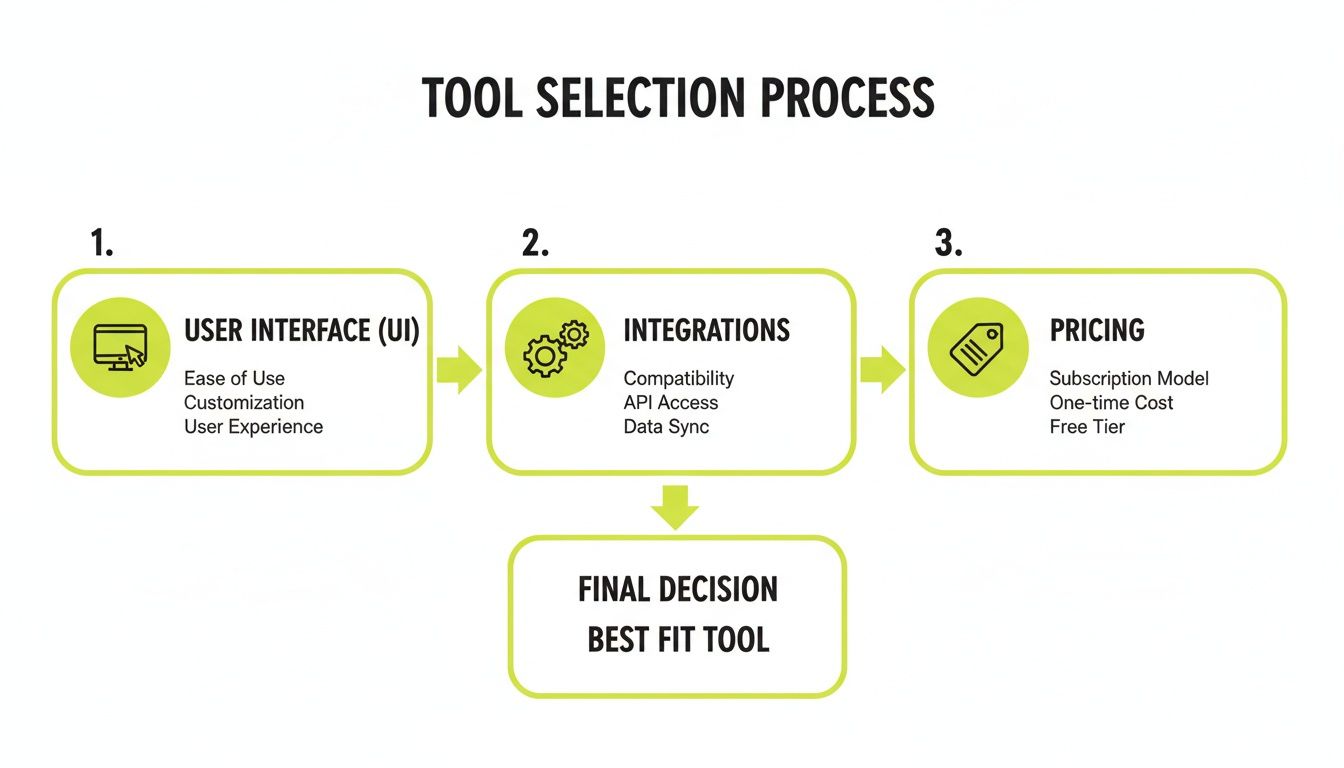
The best tool isn't the one with the most bells and whistles. It's the one that fits seamlessly into how you already work, letting you set up these powerful automations without pulling your hair out.
Real-World Example: An Online Boutique
Imagine "The Style Nook," a small shop selling unique accessories online. A customer adds a beautiful necklace to her cart, but her dog starts barking, and she leaves the site.
Workflow Trigger: A customer adds an item to their cart but doesn't complete the purchase within one hour.
Email 1 (Sent 1-4 hours after abandonment):
- Subject: Did you forget something?
- Body: This is a low-pressure, helpful reminder. It should show a picture of the item they left behind with a direct link back to their cart. The tone is key—think "Hey, we saved this for you!" not "Buy this now!" A simple, "It looks like you left something special in your cart! Ready to take another look?" works perfectly.
Email 2 (Sent 24 hours after abandonment):
- Subject: Your Style Nook cart is about to expire
- Body: This email introduces a little urgency and maybe a small sweetener. "We're still holding your items for you! Complete your order in the next 24 hours and enjoy free shipping on us. Don't miss out!" That little push is often all it takes.
This two-step process can easily recover a huge chunk of otherwise lost sales, directly boosting revenue with zero extra work after the initial setup.
The No-Show Reducing Appointment Reminder
If you run a service-based business—a salon, a consultancy, a clinic—a no-show is lost revenue you can never get back. Automated appointment reminders are one of the single most valuable workflows you can build. They slash no-show rates and save you a ton of administrative time.
The gold standard here is a mix of email and SMS. Why? Because it hits people on multiple channels, making it almost impossible to miss.
Real-World Example: A Financial Consultant
Meet Sarah, a financial advisor who books her client meetings online. A missed appointment isn't just wasted time; it’s a slot another client could have filled.
Workflow Trigger: A client books an appointment via her online calendar.
- Confirmation (Immediately): An email goes out confirming the date, time, and location (or video link). It also includes clear links to reschedule or cancel if needed.
- Email Reminder (48 hours before): A more detailed email reminder arrives. This is a great chance to add value, maybe by linking to a pre-call questionnaire or a blog post on "5 Questions to Ask Your Financial Advisor."
- SMS Reminder (24 hours before): A short and sweet text message is perfect for a quick check-in. "Hi [Client Name], friendly reminder of your appointment with Sarah tomorrow at 2:00 PM. Please reply YES to confirm or call us at [Phone Number] to reschedule."
- Final SMS Reminder (1 hour before): One last quick text keeps the meeting top-of-mind. "See you soon! Your meeting with Sarah is in one hour."
This multi-channel attack makes it nearly impossible for a client to forget. It shows professionalism and communicates that you respect both their time and your own.
To wrap it all up, here's a quick look at how these three essential workflows stack up.
Essential Automation Workflow Comparison
| Workflow | Primary Goal | Key Channels | Typical Result |
|---|---|---|---|
| Welcome Series | Build trust and guide new leads toward a first purchase. | Higher long-term engagement and conversion rates from new subscribers. | |
| Abandoned Cart | Recover sales from customers who were close to buying. | Email, SMS (optional) | An immediate 5-15% recovery of otherwise lost revenue. |
| Appointment Reminders | Reduce costly no-shows and save admin time. | Email, SMS | A significant drop in missed appointments, often by over 40%. |
Implementing even one of these workflows can make a noticeable impact on your business. By starting with these proven, high-impact automations, you're building a powerful foundation for scalable growth.
How to Measure and Optimize Your Automations
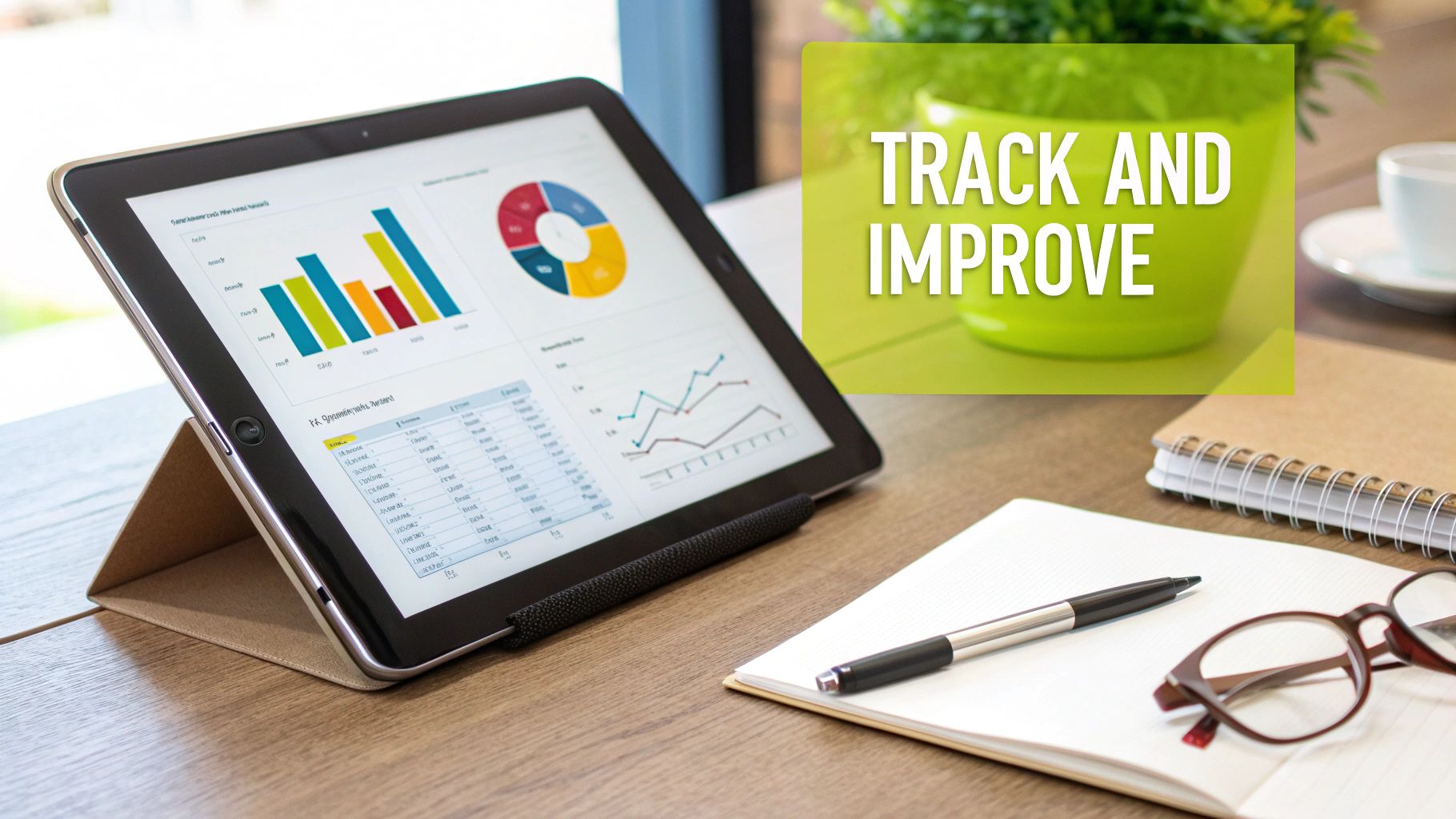
Getting your first automation workflows up and running is a huge milestone, but the real power of marketing automation for small businesses comes from what you do next. Great automation is never a "set it and forget it" machine. It’s a dynamic part of your marketing that needs to be watched, understood, and consistently refined.
Think of your automation data as a direct line to your customers. Every open, click, and purchase is a piece of feedback telling you exactly what’s hitting the mark and what’s falling flat. Learning to interpret this feedback is what separates businesses that just use automation from those that truly grow with it.
Focusing on the Core Metrics That Matter
It's tempting to track dozens of metrics, but that's a quick way to get lost in the weeds. For a small business, it's far more effective to zero in on a handful of key performance indicators (KPIs) that tell you the real story of your automated campaigns.
For email automation, these are the big three:
- Open Rate: This is your first impression. A high open rate means your subject lines are compelling enough to cut through the inbox clutter and grab someone's attention. A good benchmark for a small business is 20-25%.
- Click-Through Rate (CTR): This tells you if your message delivered on the promise of your subject line. A strong CTR (aim for 2-5%) means your content, offer, and call-to-action were relevant and persuasive.
- Conversion Rate: This is the bottom line. It tracks how many people actually followed through on the desired action—making a purchase, booking a demo, or downloading a guide. This is the ultimate measure of ROI.
These metrics are powerful diagnostic tools when you look at them together. For instance, a high open rate but a dismal CTR is a classic red flag. It tells you that your subject line wrote a check that your email content couldn't cash. You earned the open, but the message itself missed the mark. Having the right marketing analytics tools is crucial for keeping a close eye on these numbers.
The Power of A/B Testing for Optimization
Once you know what the numbers are saying, you can start improving them. The single best way to do this is through A/B testing (or split testing). It sounds technical, but the idea is incredibly simple: test two slightly different versions of one thing to see which one your audience responds to better.
A/B testing is your secret weapon against guesswork. It’s a straightforward, data-backed method to let your audience tell you exactly what they prefer, leading to small, steady improvements that can compound into serious revenue growth.
This is how you make small, informed changes that deliver big results. You don't need a massive email list or a complicated setup to get started, either. Even simple tests can uncover game-changing insights.
A Practical A/B Testing Scenario
Let's revisit our abandoned cart workflow. You've noticed the second email in your sequence has a respectable 35% open rate, but the click-through rate is a disappointing 3%. Something is stopping people from coming back, and you suspect your offer isn't quite right.
This is a perfect spot for a simple A/B test.
- Your Hypothesis: Offering free shipping will be a stronger hook than a percentage discount.
- The Test: You'll create two versions of that second abandoned cart email.
- Version A (The Control): Your current email, which offers a 10% discount.
- Version B (The Variant): An identical email, but it offers free shipping instead of the discount.
- The Execution: Your automation platform will handle the rest, sending Version A to 50% of users who enter the workflow and Version B to the other 50%. Let it run for a couple of weeks or until you have a solid sample size (say, at least 100 sends per version).
- The Analysis: After the test, you check the results. Version B (free shipping) didn't just win; it dominated with a 7% CTR and led to a 20% increase in recovered carts. The data is clear. Now you can confidently update the workflow to make the free shipping offer the new standard for everyone.
Still Have Questions About Small Business Automation?
Getting into marketing automation can feel like a huge step, and it almost always sparks more questions than answers. I talk to small business owners every day who have the exact same hesitations—worries about the cost, the complexity, and the risk of losing that personal touch that makes their business special.
Let's cut through the noise and tackle these common questions head-on. No jargon, just straightforward, practical answers to help you move forward with confidence.
How Much Does Marketing Automation Actually Cost?
You really don’t need a massive budget to get your foot in the door. The market is packed with platforms offering free or incredibly affordable starter plans, many falling in the $20 to $50 per month range for a small list of contacts.
These entry-level plans are perfect because they usually include all the essential features you need for foundational workflows, like a simple welcome email series. For example, Mailchimp's free plan allows up to 500 contacts and 1,000 email sends a month, which is plenty to get started.
As your business scales and your list grows, you’ll likely find the sweet spot is somewhere between $100 and $300 a month. But the real focus shouldn't just be the monthly fee. Think about the return on that investment. An effective abandoned cart sequence that recovers even a handful of sales each month can easily pay for the entire platform, and then some.
Is This Stuff Too Technical for Me to Handle?
This is probably the biggest myth holding people back. Modern automation tools are built specifically for business owners and marketers, not developers. They almost all feature intuitive, visual drag-and-drop editors.
Honestly, if you can sketch a simple flowchart on a napkin (like, "When someone signs up, send them this email"), you already have the core skill you need to build a workflow.
Plus, most platforms come loaded with pre-built templates for the most common automations. This means you can launch a professional welcome series or cart recovery sequence in minutes by just tweaking a proven blueprint. You’re not starting from scratch. The initial learning curve is usually just a few hours, not weeks of pulling your hair out.
Will Automation Make My Business Feel Robotic and Impersonal?
It's a totally valid concern, but when you use automation the right way, it actually does the complete opposite. It lets you create deeper, more meaningful personalization at a scale that would be impossible to manage by hand.
Instead of blasting one generic message to your entire list, you can send super-targeted communications based on what a customer actually does.
Automation handles the process, not the personality. It frees you up from repetitive tasks so you can have more of the meaningful, one-on-one conversations that build real customer loyalty.
For example, a local pet store could use automation to send a birthday email for a customer's dog, including a coupon for their favorite brand of treats. Or you could follow up with someone who visited a specific product page but didn't buy. This kind of attention to detail makes customers feel seen and understood, creating an experience that's far more personal than a one-size-fits-all email blast ever could.
How Quickly Will I Actually See Results?
The impact of automation really happens in two stages: the immediate wins and the long-term, cumulative value.
You can see some results almost instantly. Set up an abandoned cart workflow, and it could recover its first sale within hours of going live. An automated appointment reminder can prevent a no-show the very next day. These are the quick, satisfying victories.
But the true, compounding value—the kind that comes from building stronger customer relationships and nurturing leads over the long haul—really starts to show within 3 to 6 months. This gives your automated systems enough time to interact with a decent number of people and gives you enough data to start making smart tweaks. The value just keeps building as your automations work for you 24/7 in the background, creating a reliable engine for growth.
Ready to stop juggling all those repetitive tasks and start building a scalable system for growth? At Silver Spoon Agency, we specialize in implementing AI-powered marketing automation that drives real, measurable revenue. Discover how our performance-driven strategies can transform your business.